
Continuous Database Deployment (CDD): A DataOps Core Practice
Continuous database deployment (CDD) is the database version of continuous deployment (CD). In CD, when your continuous integration (CI) run succeeds, your changes are automatically promoted to the next environment. CDD is the automated deployment of successfully built database assets from one environment/sandbox to the next, accounting for the implications of persistent data.
This article explores the following topics:
- What is continuous database deployment?
- How do you get continuous database deployment to work?
- How does continuous database deployment fit in?
- Continuous database deployment in context
- Recommended resources
1. What is Continuous Database Deployment (CDD)?
Figure 1 overviews how CDD works, showing how assets move from one database sandbox to another, potentially even into production.
Figure 1. Continuous database deployment (CDD) (click to enlarge).

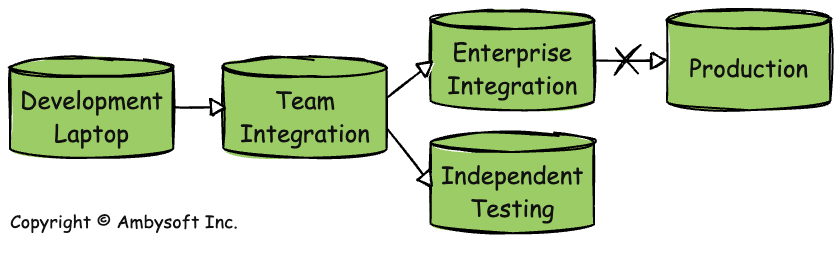
Figure 2 depicts the deployment pipeline of the fictional data team described in my book Not Just Data: How to Deliver Continuous Enterprise Data. The deployment stages of this pipeline are:
- Development laptop to team integration (automated). Everyone on the team has a complete development environment, including an instance of the database, on their laptops. When I have completed something, I check it into configuration management (CM), and the continuous database integration (CDI) tool is automatically invoked. When the build is successful, the CDD tool detects this and automatically deploys the changes to the team integration environment, where they are checked in, and the system is built via CDI at this level. Any changes that other developers have made since I last checked my code in are downloaded to my laptop. If I’ve broken the build, I’m now responsible for making the changes to fix it. If my changes haven’t broken the build, then the CDD process continues.
- Team integration to independent testing (automated). Successful changes from the team integration environment are automatically deployed to the independent testing environment, and the CDI tool rebuilds the system there. This team works in a regulatory environment that requires some testing be performed independently (outside) of the team. To make this as efficient as possible, they have adopted the practice of parallel independent testing.
- Team integration to enterprise integration (automated). Successful changes from the team integration environment are automatically deployed to the enterprise environment, and the CDI tool rebuilds the system there. This environment is where all mission-critical systems at BigFinCo are integration-tested to identify any incompatibilities before updates are released into production.
- Enterprise integration to production (currently manual). At BigFinCo, the decision to deploy into production isn’t automated yet, hence the X on the arrow. Senior leadership isn’t yet comfortable with a fully automated CDD pipeline, so they’ve kept humans in the loop at this decision point. They are finding that this is slow and expensive. Because it is very rare for them to decide not to deploy to production, they are considering automating this as well.
Figure 2. Continuous database deployment (CDD) in practice (click to enlarge).
2. Getting Continuous Database Deployment (CDD) to Work
In my experience, these are key factors to getting CDD to work in practice:
- Database versioning. Each integration DB must know its version to support database evolution. Common strategies include storing a date/time stamp of the last successful deployment or incrementing an incremental number whenever a schema update occurs.
- All database assets must be put under CM control. Just like all programming assets, such as source code and images, must be maintained under CM control, so must database assets. Database assets include structure definitions, functions, metadata (describing data contracts, …), reference data, APIs (data contracts, services, …). This is required because your CI/CDI tooling monitors your CM environment.
- Understanding that CDD is regulatory compliant. I have found that CDD can be regulatory compliant because the decision to deploy is well defined (it’s captured in clear, coded logic); records of the deployment are maintained (via automatic logging); and because the decision to deploy is not being made by the development team. Interestingly, competent auditors prefer CD/CDD strategies over manual deployment strategies because they are easier to audit. Having said all this, my advice is always to read and understand the applicable regulations that you are working under.
3. How Continuous Database Deployment (CDD) Fits In
Figure 3 depicts the agile database techniques stack, showing how the development strategies of agile data/DataOps are related. As you can see, CDD, being a technical and highly automatable practice, is invoked near the bottom of the stack.
Figure 3. The agile database techniques stack (click to enlarge).
4. Continuous Database Deployment (CDD) in Context
The following table summarizes the trade-offs associated with continuous database deployment and provides advice for when (not) to adopt it.
| Advantages |
|
| Disadvantages |
|
| When to Adopt This Practice |
|
5. Recommended Resources
- The Agile Database Techniques Stack: The Dev Side of DataOps
- Continuous Database Integration (CDI): A DataOps Practice
- Database Configuration Management
- Introduction to DataOps: Bringing Databases Into DevOps
- Not Just Data: How to Deliver Continuous Enterprise Data – Some of the material for this article was adapted from this book